
20% off on your first order: use the promocode WELCOME
Custom Menu Printing for Your Restaurant
Take-out menus are your restaurant’s invitation to delicious convenience. With a clear, well-organized layout, they make ordering easy while showcasing your best dishes. Whether bold and vibrant or sleek and elegant, customize the design, size, and finish to reflect your brand and leave a lasting impression.
Custom Menu Printing for Restaurants, Cafés, and Takeout
A well-designed menu does more than list dishes and prices: it helps customers explore your offer, reinforces your visual identity, and contributes to the overall dining experience. With Pixartprinting, you can create custom menus for restaurants, cafés, bars, takeout businesses, food trucks, catering services, and other hospitality venues. Our menu printing service gives you the flexibility to combine your branding, food photography, descriptions, prices, and promotions in a practical printed format tailored to your business.
Whether you are updating your everyday restaurant menu, introducing seasonal dishes, preparing a takeout menu, or creating a dedicated drinks or dessert list, you can configure your printed menus online and order from just 25 copies. Choose the folding style, format, paper, and printed sides that best suit your layout, then upload your artwork or create your design using Pixartprinting's free online editor.
Choose the Right Fold and Size for Your Custom Menus
The format of your menu influences both its appearance and how easily customers can find the information they need. Pixartprinting offers several folding configurations for custom menu printing, allowing you to organize dishes, drinks, prices, promotions, and other information into clear sections.
- Half Fold: available in 8.5" x 11", 9" x 8", 9" x 16", and 11" x 17". This classic folded format is ideal for dividing your menu into clearly defined areas for appetizers, main courses, desserts, drinks, or takeout options.
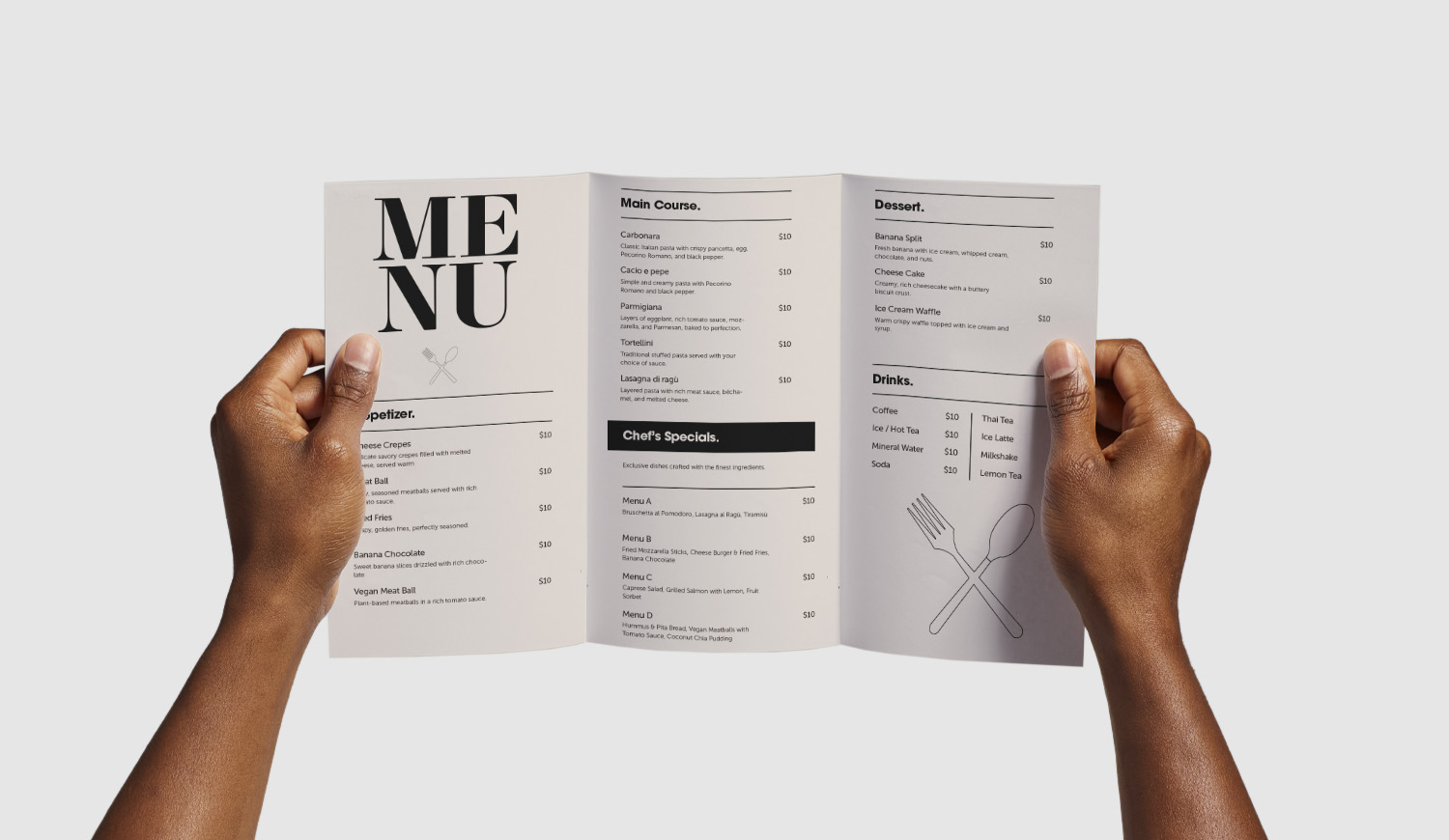
- Letter Fold: available in 8.5" x 11" and 8.5" x 14". Its three-panel structure is useful for organizing larger amounts of information while keeping the closed menu compact and easy to handle.
- Z-Fold: available in 8.5" x 11". This accordion-style fold creates multiple panels that can be used for different menu categories, daily specials, promotions, contact details, or ordering information.
You can also choose between front-only and front-and-back printing. Printing on both sides provides additional space for restaurants with larger menus, while front-only printing may be suitable for shorter menus, limited selections, event menus, or promotional offers.
Custom Menu Printing on Matte or Glossy Paper
The paper you choose plays an important role in the appearance and readability of your custom menus. A text-heavy restaurant menu may benefit from a matte surface that minimizes reflections, while a design featuring photography and bold colors can benefit from a glossy finish. Pixartprinting offers four paper options for menu printing:
- 5pt Matte: a smooth, shine-free paper suited to text-heavy designs. Its matte surface supports clear readability and works well for menus containing detailed descriptions, ingredients, or extensive price lists.
- 5pt Glossy: a smooth, reflective paper designed to enhance colors, photographs, and contrast. It is particularly suitable for menus featuring images of dishes, desserts, cocktails, or other visual elements.
- 9.5pt Premium Matte: a thicker matte option that combines a non-reflective surface with a more substantial feel. It is a strong choice when you want your printed menu to have a more structured and refined appearance.
- 9pt Premium Glossy: a thicker glossy option that enhances photographs and colors while giving your menu a more substantial feel.
When deciding between matte and glossy paper, consider the balance between text and images in your artwork, the lighting in your restaurant, and the type of presentation you want to create. Combining the right paper with the appropriate size and folding style can make your menu easier to read while keeping it consistent with your brand identity.
Design Custom Menus with Our Free Online Editor
You do not necessarily need professional graphic design software to prepare your menu. Pixartprinting's free online editor allows you to work on your design directly online. You can add your logo, text, colors, images, and other visual elements to create a menu that matches your restaurant's identity.
If you already have a print-ready design, you can simply upload your artwork during the ordering process. Starting from only 25 copies also gives you flexibility when you need a limited quantity for a seasonal menu, new restaurant opening, special event, promotional campaign, or test run before ordering a larger batch.
Menu Design: Our Tips for an Effective Layout
A successful menu design should make information easy to find while reflecting the personality of your restaurant. Start with a clear visual hierarchy. Use easy-to-identify section headings for categories such as appetizers, main courses, desserts, drinks, or specials, and make sure product names, descriptions, and prices can be distinguished at a glance.
Typography is another important consideration. Avoid using too many different fonts and make sure text remains readable at the selected size. Leave enough space between menu items so the design does not feel overcrowded, especially when you have a large number of dishes or detailed descriptions.
The folding style should also influence your layout. A half-fold menu offers distinct pages or sections that can be dedicated to different categories. Letter-fold and Z-fold menus divide the content into multiple panels, making it easier to separate food, drinks, desserts, offers, contact information, or ordering instructions.
If you use food photography, choose clear, high-quality images and keep the visual style consistent throughout the menu. Your logo, colors, typography, and graphic elements should also coordinate with other branded materials used in your venue. Before submitting your design, carefully review dish names, prices, contact details, opening hours, QR codes, and any other information to reduce the risk of errors appearing across the entire print run.
Custom Menus vs. Table Tents: Which Should You Choose?
Custom menus and custom table tents can both communicate food, drink, or promotional information, but they are designed for different purposes. Printed menus are generally the better choice when you need to present a complete or extensive selection of dishes, drinks, descriptions, and prices. Table tents are self-standing printed displays designed to remain visible on tables, counters, or other surfaces. They are particularly useful for highlighting a smaller amount of information, such as daily specials, featured cocktails, desserts, limited-time promotions, QR codes, or special events.
For many restaurants and cafés, the two formats work well together. You can use custom menus to present your complete food and beverage selection and table tents to give extra visibility to specific offers or high-priority messages.
Menu Printing for Takeout, Dining, Events, and Seasonal Offers
Professional menu printing can support many different types of hospitality businesses and occasions. Restaurants can use printed menus for everyday table service, while cafés and bakeries can create compact formats for drinks, breakfast items, pastries, or lunch selections. Takeout businesses can include dishes, prices, contact details, ordering instructions, and other useful information in a format customers can easily take with them.
Custom menus can also be useful for catering services, private events, pop-up restaurants, hotels, tastings, food trucks, and seasonal promotions. Because you can order starting from 25 copies, it is easier to produce menus for temporary offers or limited-time events without committing to a large print quantity.
How to Order Custom Menus Online
Ordering custom menus with Pixartprinting is straightforward. Start by choosing the folding style and size that best fit your content. Select your preferred paper type, decide whether you want printing on the front only or on both the front and back, and choose the quantity you need, starting from 25 copies.
You can then upload your print-ready artwork or use the free online editor to prepare your menu directly online. Before completing your order, review your configuration carefully to make sure the selected size, fold, paper, printed sides, and quantity correspond to your project.
This flexible process makes custom menu printing suitable for both established restaurants and businesses that need smaller or frequently updated print runs.
Other Printed Products for Your Restaurant or Café
Create a more consistent visual identity throughout your venue by combining your custom menus with other printed and branded products. Depending on your business, you can complement menu printing with:
- Custom Placemats – add your branding, graphics, promotions, menu highlights, or other information directly to the table setting.
- Saddle-Stitched Booklets – useful when you need additional pages for extensive menus, wine lists, hospitality presentations, or event information.
- Brochures – present catering services, venue information, private event packages, or other detailed offers in a structured printed format.
- Roll Labels – customize bottles, jars, food packaging, takeout containers, or other branded products.
- Custom Clothing – coordinate staff apparel with the visual identity used across your menus and restaurant materials.
Using the same colors, logo, typography, and visual elements across different printed products can help create a recognizable and consistent brand experience throughout your restaurant, café, bar, or takeout business.
FAQ About Custom Menu Printing
- What is the minimum quantity for custom menu printing? You can order custom menus from 25 copies, making it possible to print both smaller batches and larger quantities depending on your needs.
- What folding options are available for custom menus? You can choose from Half Fold, Letter Fold, and Z-Fold. The available sizes depend on the folding style you select.
- Can I print on both sides of my menu? Yes. You can choose front-only printing or front-and-back printing depending on the amount of content you want to include.
- Can I design my menu online? Yes. Pixartprinting provides a free online editor that you can use to create and customize your menu. If you already have print-ready artwork, you can upload your file instead.
- Which paper should I choose for my custom menu? The best option depends on your design. Matte papers provide a shine-free surface suited to text-heavy menus, while glossy papers emphasize colors and images. Available options include 5pt Matte, 5pt Glossy, 9.5pt Premium Matte, and 9pt Premium Glossy.